
The internet powers nearly every aspect of modern life. Whether you’re shopping online, reading blogs, booking appointments, or using web applications, web development is what makes these digital experiences possible.
If you’ve ever wondered what web development is, how websites are created, or what technologies developers use, this complete guide will walk you through everything you need to know.
In this beginner-friendly guide, you’ll learn:
- What is web development
- How websites are built
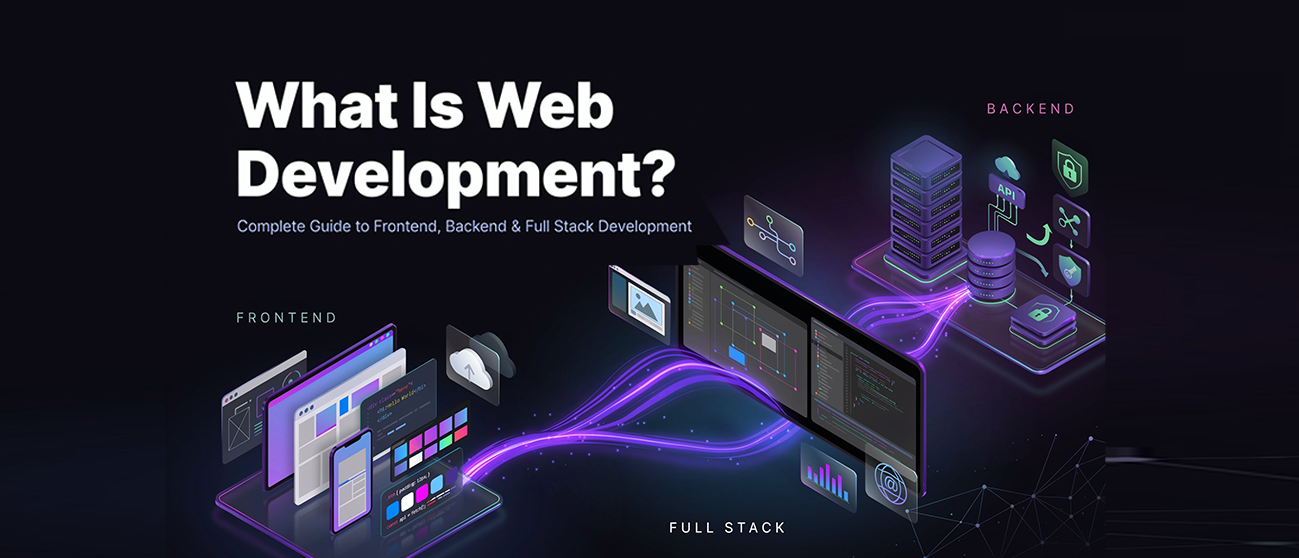
- Frontend vs backend development
- Core web development technologies
- Types of web development
- Website development process
- Modern trends shaping the industry
- Essential tools developers use
By the end, you’ll have a solid understanding of the entire web development ecosystem.
What Is Web Development?
Web development is the process of creating, building, and maintaining websites and web applications that run on the internet.
It involves designing website interfaces, writing code, managing databases, configuring servers, and ensuring websites function properly across different devices and browsers.
Simple Definition
Web development is the practice of transforming an idea into a functional website or web application that users can access through a web browser.
Examples include:
- Business websites
- E-commerce stores
- SaaS platforms
- Social media networks
- Educational portals
- Online booking systems
- Blogs and news websites
Without web development, websites simply wouldn’t exist.
What Does a Web Developer Do?
A web developer:
- Writes code for websites
- Builds website functionality
- Creates responsive user interfaces
- Connects websites with databases
- Integrates APIs and third-party services
- Optimizes website performance
- Maintains website security
- Deploys websites to hosting servers
How Does Web Development Work?
To understand how websites are built, think of a website as a digital building.
Every website requires:
1. Domain Name
A domain name is your website’s address.
Examples:
- Axoic.site
- google.com
- amazon.com
Users type the domain into their browser to access the website.
2. Web Hosting
Hosting stores all website files and makes them accessible online.
When someone visits your website, the hosting server sends the website files to their browser.
3. Frontend
The frontend is everything users see and interact with.
This includes:
- Layouts
- Buttons
- Navigation menus
- Images
- Forms
- Animations
4. Backend
The backend handles data processing and business logic.
It manages:
- User accounts
- Authentication
- Databases
- Payments
- Content management
5. Database
Databases store information such as:
- Customer records
- Product information
- Blog posts
- Orders
- User profiles
Together, these components create a fully functional website.
Core Web Development Technologies
Modern web development relies on several fundamental technologies.
HTML: The Structure of a Website
HTML (HyperText Markup Language) creates the structure of web pages.
It defines:
- Headings
- Paragraphs
- Images
- Links
- Forms
- Tables
Think of HTML as the skeleton of a website.
Example Uses
- Creating page layouts
- Adding text content
- Embedding media
- Structuring navigation
CSS: The Design Layer
CSS (Cascading Style Sheets) controls how websites look.
CSS manages:
- Colors
- Fonts
- Spacing
- Layouts
- Animations
- Responsive design
Without CSS, websites would appear as plain text and basic elements.
JavaScript: The Interactive Layer
JavaScript adds functionality and interactivity.
Examples include:
- Interactive forms
- Image sliders
- Dynamic content updates
- Live chat systems
- Search functionality
JavaScript transforms static pages into engaging user experiences.
Front End vs Backend Development
One of the most common questions beginners ask is:
What Is the Difference Between Frontend and Backend Development?
Frontend Development
Frontend development focuses on the user-facing portion of a website.
Frontend developers build:
- Navigation menus
- Buttons
- User interfaces
- Mobile-responsive layouts
- Interactive experiences
Common frontend technologies:
- HTML
- CSS
- JavaScript
- React
- Vue.js
- Angular
Backend Development
Backend development powers the functionality behind the scenes.
Backend developers work with:
- Servers
- Databases
- APIs
- Authentication systems
- Business logic
Popular backend technologies:
- Node.js
- PHP
- Python
- Java
- Ruby
- ASP.NET
Key Difference
Frontend = What users see
Backend = How the website works
Both are essential for successful web development.
What Is Full Stack Development?
A full stack developer works on both frontend and backend systems.
They can:
- Design user interfaces
- Build databases
- Configure servers
- Develop APIs
- Deploy applications
Full stack development combines all major areas of website creation into one skill set.
Common Full Stack Technology Stack
Frontend:
- HTML
- CSS
- JavaScript
- React
Backend:
- Node.js
- Express.js
Database:
- MongoDB
This combination is commonly known as the MERN Stack.
Types of Web Development
Web development can be divided into several categories.
1. Frontend Development
Focuses on user experience and visual presentation.
Best for:
- UI development
- Website design implementation
- Responsive layouts
2. Backend Development
Focuses on server-side functionality and data management.
Best for:
- Business applications
- E-commerce systems
- Membership platforms
3. Full Stack Development
Combines frontend and backend expertise.
Best for:
- Startups
- MVP development
- End-to-end website projects
4. CMS Development
CMS stands for Content Management System.
Popular CMS platforms include:
- WordPress
- Shopify
- Webflow
- Drupal
CMS development allows businesses to manage content without extensive coding knowledge.
5. E-Commerce Development
Specialized development focused on online stores.
Includes:
- Product catalogs
- Payment gateways
- Shopping carts
- Order management systems
Website Development Process
A professional website follows a structured development process.
Step 1: Discovery and Planning
The development team identifies:
- Business goals
- Target audience
- Features
- Content requirements
Proper planning prevents costly revisions later.
Step 2: Wireframing
Wireframes create a visual blueprint of the website structure.
They help define:
- Layouts
- Navigation
- User journeys
Step 3: UI/UX Design
Designers create visual interfaces focused on usability and branding.
This stage includes:
- Color schemes
- Typography
- Design systems
- Responsive layouts
Step 4: Development
Developers transform designs into working websites using code.
Frontend and backend systems are built during this stage.
Step 5: Testing
Testing ensures:
- Functionality works correctly
- Performance is optimized
- Security vulnerabilities are addressed
- Mobile responsiveness is maintained
Step 6: Deployment
The website is launched on a live hosting environment.
Deployment includes:
- Server configuration
- Domain connection
- SSL installation
- Performance optimization
Step 7: Maintenance
Websites require ongoing updates to maintain:
- Security
- Speed
- Compatibility
- Functionality
Essential Web Development Tools
Professional developers use specialized tools to improve efficiency.
Code Editors
Popular choices include:
- Visual Studio Code
- Sublime Text
- WebStorm
Version Control
Git is the industry standard for version control.
Benefits include:
- Code tracking
- Collaboration
- Backup management
- Change history
GitHub and GitLab are commonly used platforms.
Development Frameworks
Frontend Frameworks:
- React
- Vue
- Angular
Backend Frameworks:
- Express.js
- Laravel
- Django
- Spring Boot
Frameworks accelerate development and improve scalability.
Database Systems
Common databases include:
- MySQL
- PostgreSQL
- MongoDB
- SQLite
Databases store and organize website data efficiently.
Understanding Web Architecture
Web architecture refers to how different components interact.
A typical website architecture includes:
Client Side
The browser users interact with.
Server Side
Processes requests and business logic.
Database Layer
Stores website information.
APIs
Allow systems to communicate with one another.
Modern web applications rely heavily on APIs for integrations such as:
- Payment gateways
- CRM systems
- Marketing platforms
- Analytics tools
Why Responsive Design Matters
Today, users browse websites from:
- Smartphones
- Tablets
- Laptops
- Desktop computers
Responsive design ensures websites automatically adapt to different screen sizes.
Benefits include:
- Better user experience
- Lower bounce rates
- Higher engagement
- Improved SEO performance
Google prioritizes mobile-friendly websites in search results.
Modern Web Development Trends
The industry continues to evolve rapidly.
AI-Powered Websites
Artificial intelligence is improving:
- Personalization
- Customer support
- Content recommendations
- Search experiences
Progressive Web Apps (PWAs)
PWAs combine the benefits of websites and mobile apps.
Advantages include:
- Offline access
- Fast loading speeds
- App-like experiences
Headless CMS
Headless architecture separates content management from frontend presentation.
Benefits include:
- Greater flexibility
- Faster performance
- Omnichannel publishing
Serverless Architecture
Serverless computing reduces infrastructure management while improving scalability.
Popular platforms include:
- AWS Lambda
- Vercel
- Netlify Functions
Why Businesses Need Professional Web Development
A website is often the first impression customers have of your brand.
Professional web development helps businesses:
- Build credibility
- Increase conversions
- Improve user experience
- Generate leads
- Strengthen SEO performance
- Support long-term growth
A poorly developed website can negatively impact customer trust and revenue.
How Axoic Helps Businesses Build High-Performing Websites
At Axoic, we develop websites that are designed for growth, performance, and conversions.
Our web development services focus on:
- Custom website development
- Responsive design
- SEO-friendly architecture
- Fast-loading pages
- E-commerce development
- CMS solutions
- Website maintenance and optimization
Whether you’re launching a new business website or upgrading an existing platform, our team creates solutions tailored to your goals.
Related Services:
Final Thoughts
Understanding what web development is is the first step toward building a successful online presence. From HTML and CSS to backend systems, APIs, databases, and deployment, web development combines multiple technologies to create websites and applications that users rely on every day.
As businesses continue to invest in digital experiences, web development remains one of the most important disciplines in the technology industry.
Whether you’re a student, entrepreneur, or business owner, learning the fundamentals of web development will help you better understand how the modern web works and how powerful websites are built.
Frequently Asked Questions
JavaScript is currently one of the most widely used programming languages in web development.
Basic web development can be learned within a few months. Becoming a professional developer typically requires continuous learning and practical experience.
Web development has a learning curve, but beginners can start with HTML, CSS, and JavaScript before progressing to advanced frameworks and backend technologies.
Web design focuses on appearance and user experience, while web development focuses on functionality and coding.
Yes. Coding is a fundamental part of web development, although some no-code platforms reduce the amount of coding required.
Leave a Reply